


01
Pick your desk crew
Capital, Creator, Signature — or the full stack. Change anytime in Settings.

CurXor™ is a desk appliance with CurXor OS™. Capital, Creator, and Signature — desks that already want a job, on a box you own. Local inference, and a command dashboard on your network. $3,999 once · $0/mo API for the operate plane.
Twelve desks. Some always on, some for the work you do. The desks keep working while you're away. Money, a send, a post, or a trade waits until you confirm.
126 TOPS · 64GB UMA
The MS-S1-class box.
What is this?
A MINISFORUM MS-S1-class appliance. Plug into your network. You own the hardware.
Agents, intelligence, and control stay on your metal — not a cloud subscription.
Digital employees on your box. Twelve desks. Some always on, some for the work you do. Capital, content, Signature, and more. Mint more in The Forge.
You compose the score. Unplug egress — the hall keeps thinking. The symphony plays on your metal. Mint autonomous employees →
How it works
Pick your desk crew, chat or tap, stay on your box — disconnect outbound when you want it off. The desks keep working while you're away. Money, a send, a post, or a trade waits until you confirm.
01
Capital, Creator, Signature — or the full stack. Change anytime in Settings.
02
Flight Command, Telegram, Slack — one local router, same crewmates.
03
Think on your box. Your data stays. You choose the rare call that leaves.
04
Unplug the outbound cable — outbound stops. Chat and planning stay on the local models on this appliance.
Deeper context: working product on real metal · journal
FLIGHT COMMAND · DEMO
Desk captures from MS-S1 metal — Capital, Creator, Signature. Demo capture · MS-S1 box · Aug 2026

Swipe sideways to read this desk.
Grouped desk crew. Chat or tap skills.

Swipe sideways to read this desk.
Practice mode · paper book — rules run on the appliance; live broker book not shown.

Swipe sideways to read this desk.
Create queue · sovereign copy · schedule with approval gates.
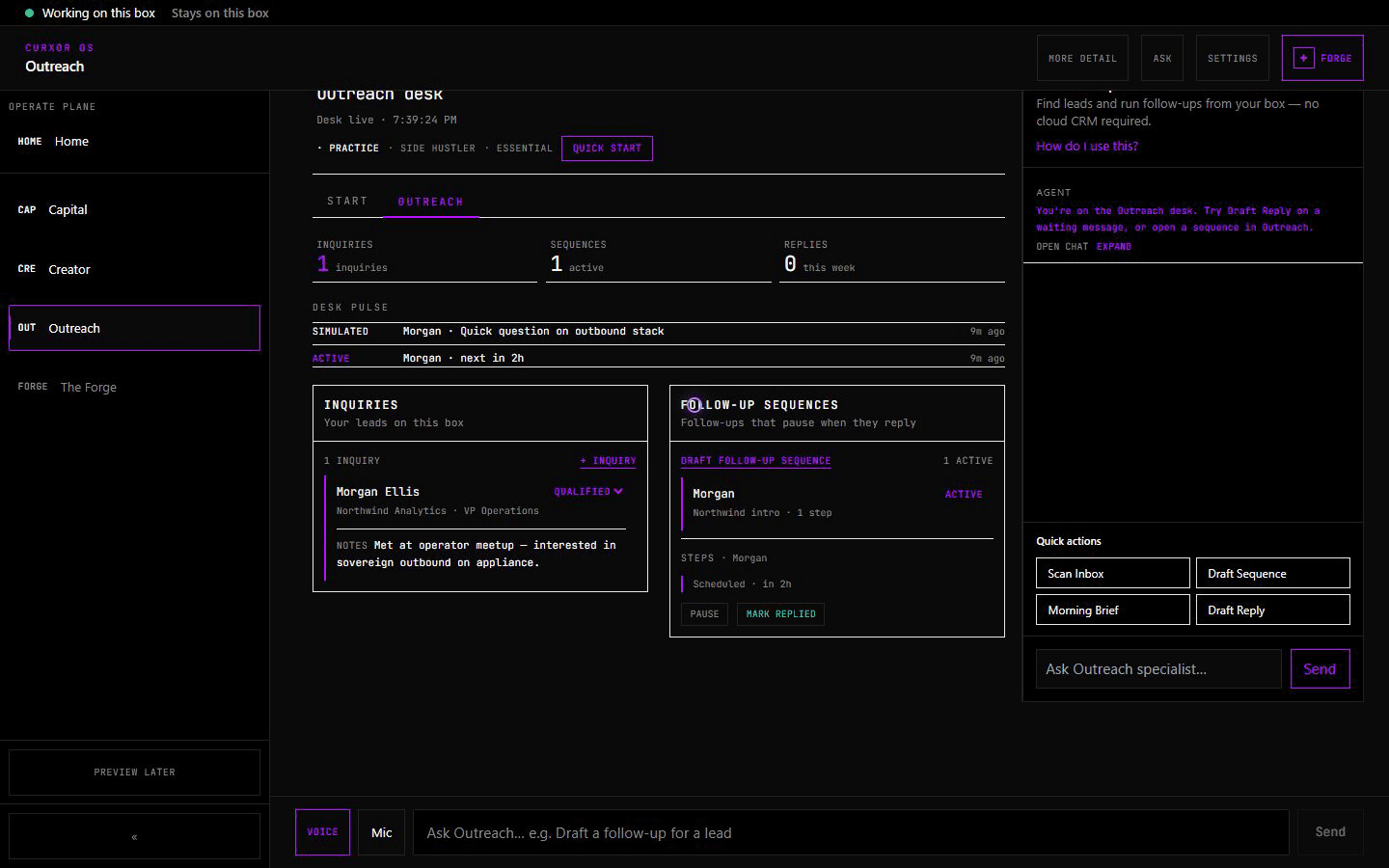
Swipe sideways to read this desk.
UI and routing are real · outbound sends need operator-configured bridges on the outbound cable (not a customer fleet).
Twelve desks. Some always on, some for the work you do. Previews stay labeled on the dashboard. We don't dress mock depth as production at $3,999.
MEET YOUR OPERATORS
Composite operator stories — the grammar gap in human terms. Not paid endorsements; product proof in the desk tour above.
SIGNATURE
Signature · Creator · Capital
“Twelve clients, one appliance. Signature pauses sequences on reply before I pour coffee — no HubSpot rent, no token meter.”
Run Signature sequences, Creator pipelines, and Capital rules from one desk. Local inference. Outbound on egress you control.
GROWTH
Creator · Crew Cafe
“Draft at 2am. Schedule at 8. Posts only when I Confirm.”
Draft, adapt, and schedule across channels. Creator runs on your metal; publishes through egress when you approve.
Composite
Capital
“I stopped renting alpha from the cloud. Capital backtests on localhost — paper book on my desk, or nowhere if I pull the plug.”
Capital runs rules-bound desk workflows on your box. Paper to learn the desk. Turn on Alpaca live when you're ready. You Confirm before a live order leaves.
Composite operators — pre-launch storytelling, not paid endorsements.
VISION
Chat SaaS gives you one assistant. CurXor gives you a desk crew — a conductor on your desk, acoustic reach when you want it, and a hall where crewmates earn presence from real Flagship activity.
Interfaces drift. Your desk conducts.Ascends with you — same appliance, deeper desks over time. No subscription tier names on the tin.
You
Composer / principal
You own the score — rules, desk setup, approvals.
CurXor desk
Conductor + orchestrator
Same desk, two registers — conducts your desk crew on metal you own.
Desk crew
Orchestra / sections
Digital employees on your metal — specialists that play in parallel: capital, content, outreach, and more.
CREW CAFE · ON METAL
Crew Cafe is the hall on your metal — XP and ascension tied to real Capital, Creator, and Signature activity. Stills captured on MS-S1.

Crew Cafe ascension · captured on MS-S1

Crew Cafe pixel room · captured on MS-S1
Captured on MS-S1 — Cafe UI ships on the appliance; not a live cloud leaderboard.
WHY CURXOR
Rent inference forever — or own it once on your desk.
CLOUD API STACK
$500+/mo
MAC STUDIO DIY
~$3,500+
PERPLEXITY MAX + MAC
$200/mo
RECOMMENDED
CurXor
$3,999 once
$0/mo CurXor API · optional BYOK only
THE STACK
Enable your crew in Settings. Mint custom crewmates from The Forge.
Rule-based investing agent — stocks, crypto, local evaluation
LEARN MORE →
Content pipeline — draft, create, adapt, publish
LEARN MORE →
Daily coordination desk — leads, sequences, CRM
LEARN MORE →
Agent factory — design and deploy new crewmates in natural language
Longevity desk — vitals, labs, longevity Q&A, and health protocol
Household mapper — profiles, scopes, and devices for everyone in your home (preview)
LOCAL MODEL BUDGETS
Assign how much of 64 GB goes to local models — not a subscription ladder.
ECONOMY
Minimal UMA footprint · moondream + qwen3.5:9b · single-crewmate kiosks
BALANCED
Recommended for most crewmates · day-one moondream + qwen3.5:9b (VL/14b only if pulled)
PERFORMANCE
Max quality on 64 GB UMA · qwen3.6 MoE for coding · VLA when manipulation intent
FAQ
CurXor is the sovereign AI box — 64GB compute with 126 TOPS NPU on your desk. CurXor, Inc. builds the hardware and CurXor OS. Twelve desks. Some always on, some for the work you do. The desks keep working while you're away. Money, a send, a post, or a trade waits until you confirm. Enable the crewmates you want, chat in plain language, and scale 24/7 with local inference by default. Category brief: curxor.ai/journal/mint-autonomous-employees.
A Mac Studio gives you inference hardware. CurXor gives you inference plus a complete agent platform: pre-built crewmate desks, The Forge wizard, dual-port networking with a kill switch on the outbound cable, digital bridges for trading and social, and a Settings hub to customize everything — ready on day one. Compare: curxor.ai/compare/mac-studio-ollama · Longer take: curxor.ai/journal/appliance-not-diy.
OpenClaw is a free assistant runtime — you supply hardware, install the stack, and harden security yourself. CurXor is the appliance product: CurXor OS, vertical desks (Capital, Creator, Signature), The Forge, Crew Cafe, and a kill switch on the outbound cable day one. Not OpenClaw packaging on a Mac Mini. Deep dive: curxor.ai/compare · Status: curxor.ai/journal/working-product-on-real-metal.
€549-class boxes are chat and messaging appliances on light compute. CurXor is operator desk depth — 64GB UMA, flagship crewmates, Forge, and Crew Cafe. $3,999 is a filter for outcomes, not a race to assistant price. Compare: curxor.ai/compare/clawbox · Appliance brief: curxor.ai/journal/appliance-not-diy.
The CurXor box, CurXor OS, Flight Command (Home hub, Settings, Simple/Expert modes, light/dark themes), Twelve desks. Some always on, some for the work you do. (enable any combination), chat workspaces with one-tap skills, optional messaging gateways (Telegram, Slack, WhatsApp, iMessage), local LLM on 64GB UMA, optional frontier LLM via your own API keys, and software updates (production customer-fleet OTA pending — see Press). No CurXor subscription or per-token fees.
No. Each crewmate opens a workspace with plain-language chat and skill buttons. Pick lanes in setup or Settings, describe what you want, and tap when you're ready. The Forge also uses natural language.
CurXor charges $3,999 once for the hardware — no monthly appliance fee and no per-token billing from us. All included crewmates run local models by default. If you optionally connect OpenAI (OAuth or API key), Anthropic, Google, or OpenRouter in Settings, those providers bill your account directly.